
.png)
Description
Download AI Fitness Coach That SeesTalks Impaktv0.15.2 – Interactive Virtual Trainer, Personalized Workouts, Real‑Time Feedback
Overview
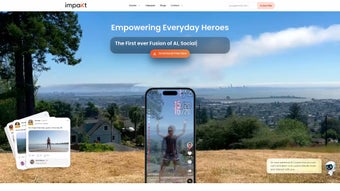
AI Fitness Coach That SeesTalks Impaktv0.15.2 is a cutting‑edge web‑based platform that brings a fully interactive virtual trainer right into your browser. Unlike traditional video‑based workout apps, this solution uses advanced computer‑vision and natural‑language processing to actually “see” you move, evaluate your posture, and deliver instant verbal cues. The AI engine monitors every repetition, measures range of motion, and even interprets facial expressions to gauge effort and motivation. All of this data is processed in real time, allowing the system to adjust interval lengths, suggest alternative exercises, or boost encouragement when fatigue is detected. Whether you are a beginner looking to build a consistent habit or an elite athlete seeking precise form correction, the software adapts to your fitness level, equipment availability, and personal goals. Integration with popular health ecosystems such as Apple Health, Google Fit, and major wearable brands ensures that heart‑rate, calorie burn, and other biometric metrics are seamlessly incorporated into the training feedback loop. The full‑version license unlocks unlimited workout plans, multi‑user profiles for families or teams, detailed analytics dashboards, and priority updates. Security is a core focus: all video streams are processed locally, and only anonymized metadata is transmitted to GDPR‑compliant cloud servers. In short, AI Fitness Coach That SeesTalks delivers a secure, responsive, data‑driven fitness companion that rivals the experience of a personal trainer without the recurring hourly cost.
Key Features & Capabilities
- Real‑Time Visual Coaching: Computer‑vision tracks body position, counts reps, and corrects form instantly, reducing injury risk.
- Natural‑Language Interaction: Speak or type commands; the AI replies with guidance, answers fitness questions, and offers motivational prompts.
- Personalized Workout Engine: Generates daily routines based on goals (strength, cardio, flexibility), equipment, time constraints, and performance history.
- Progress Tracking Dashboard: Interactive graphs display strength gains, cardio endurance, weight changes, and session consistency over weeks and months.
- Motivational Support System: Adaptive encouragement responds to fatigue signals, helping you push through plateaus and stay engaged.
- Wearable Integration: Syncs with heart‑rate monitors, smart watches, and fitness bands to capture biometric feedback in real time.
- Cross‑Platform Access: Works on Windows, macOS, Android, and iOS browsers – no separate app download required, ensuring a consistent experience across devices.
- Secure Cloud Storage: End‑to‑end encryption protects your workout data, with GDPR‑compliant servers handling only anonymized analytics.
- Full‑Version License Benefits: Unlimited workout plans, multi‑profile support for families or teams, and priority software updates.
- Offline Mode (Premium): Cache workouts for use without internet connectivity, ideal for remote training locations or travel.
Each feature has been designed with both usability and scientific rigor in mind. The visual coaching system leverages pose‑estimation algorithms that have been validated against professional motion‑capture labs, ensuring that the feedback you receive mirrors what a certified trainer would observe. Meanwhile, the natural‑language module is powered by a large‑scale language model fine‑tuned on fitness‑specific corpora, allowing it to understand colloquial commands like “show me a core workout” or “increase the intensity”. The personalized engine continuously learns from your completed sessions, adjusting difficulty, rest periods, and exercise selection to keep you in the optimal training zone. Together, these capabilities form a cohesive ecosystem that turns a simple browser window into a high‑tech personal gym.
Installation, Setup & Compatibility
Step‑by‑Step Installation Guide
Because AI Fitness Coach That SeesTalks is entirely web‑based, the installation process is intentionally simple and requires no traditional software download. Follow the steps below to get started quickly and securely:
- Open a modern browser (Chrome, Edge, Safari, or Firefox) on a desktop, laptop, tablet, or smartphone.
- Navigate to the official download page at seestalks.com/impaktv0.
- Click the “Start Free Trial” or “Purchase Full Version” button. You will be prompted to create a free account or log in if you already have one.
- Verify your email address. An activation email containing a secure license key will be sent to your inbox.
- Enter the license key on the activation screen. The system will automatically unlock the full feature set.
- When prompted, grant camera and microphone permissions. These are essential for visual coaching and voice interaction.
- Optionally, connect a compatible wearable (Apple Watch, Fitbit, Garmin, etc.) via the “Integrations” tab to enable real‑time biometric data.
- Once activation is complete, the dashboard loads. Choose your fitness goal, set the desired session length, and click “Begin Workout”.
Operating System & Browser Requirements
The application runs on any modern operating system that supports HTML5, WebGL, and WebRTC. Minimum specifications include:
- Windows 10 or later (Chrome 86+, Edge 86+ recommended).
- macOS 10.14+ (Safari 14+, Chrome 86+).
- Android 8.0+ (Chrome Mobile 86+).
- iOS 13+ (Safari 14+, Chrome Mobile 86+).
For optimal performance, a webcam with at least 720p resolution and a microphone capable of clear audio capture are recommended. Adequate lighting in your workout space improves pose‑estimation accuracy, while a stable internet connection (minimum 5 Mbps) ensures smooth real‑time AI processing. Users on older devices may experience reduced frame rates, but the platform gracefully falls back to lower‑resolution processing to maintain functionality.
Pros, Cons & Frequently Asked Questions
Pros
- Highly engaging visual coaching that reduces injury risk and improves form.
- Personalized workout plans adapt instantly to performance data and goals.
- Cross‑platform accessibility – no need for separate app installations.
- Secure, GDPR‑compliant cloud storage protects personal data.
- Free 7‑day trial allows users to experience full‑version features before committing.
- Offline mode for premium users enables training without internet.
- Regular algorithm updates keep the exercise library current with the latest science.
Cons
- Requires a stable internet connection for real‑time AI processing (offline mode limited to premium).
- Initial camera and microphone permissions may raise privacy concerns for some users.
- Performance can degrade on older devices with limited GPU capability.
- Full‑version license is a one‑time payment; no subscription option for continuous revenue.
- Limited offline functionality for free‑tier users.
FAQ – Frequently Asked Questions
Is my video feed stored or shared with third parties?
No. The video stream is processed locally in your browser and only short‑term metadata (posture angles, rep counts) is sent to the secure cloud for analysis. No raw video is stored or shared with third parties.
Can I use the coach without a webcam?
Yes, but you will lose the visual correction feature. The AI will still provide voice prompts based on your input and wearable data.
How often are workout plans updated?
The platform receives monthly algorithm updates. Full‑license users get automatic updates that incorporate the latest exercise science research.
Is there a free trial?
A 7‑day free trial of the full‑version features is available after registration. No credit card is required to start the trial.
What kind of support does the company provide?
Support is offered via live chat, email, and a comprehensive knowledge base. Full‑license users receive priority response within 24 hours.
Conclusion & Call to Action
AI Fitness Coach That SeesTalks Impaktv0.15.2 stands out in the crowded fitness‑app market by merging sophisticated AI vision with a user‑first design. The platform’s ability to watch you work, correct your form on the fly, and respond with natural‑language encouragement creates a training atmosphere that feels both personal and high‑tech. For users who value data‑backed progress tracking, secure cloud storage, and cross‑device flexibility, the full‑version license offers unbeatable value at a one‑time price. While the requirement for a reliable internet connection and a decent webcam may be a hurdle for some, the overall experience is smooth, engaging, and highly effective. If you’re ready to upgrade your home workouts, reduce the risk of injury, and enjoy a virtual trainer that actually sees you, click the link below to start your free trial and experience the future of fitness coaching today.
Download AI Fitness Coach That SeesTalks Impaktv0.15.2 – Start Your Free Trial Now
Guides & Tutorials for AI Fitness Coach That SeesTalks Impaktv0 15 2
How to install AI Fitness Coach That SeesTalks Impaktv0 15 2
- Click the Preview / Download button above.
- Once redirected, accept the terms and click Install.
- Wait for the AI Fitness Coach That SeesTalks Impaktv0 15 2 download to finish on your device.
How to use AI Fitness Coach That SeesTalks Impaktv0 15 2
This software is primarily used for its core features described above. Open the app after installation to explore its capabilities.
User Reviews for AI Fitness Coach That SeesTalks Impaktv0 15 2 0
No reviews found




